



Borrowing an Item
Finding an Item
Search the Catalog to find an item.
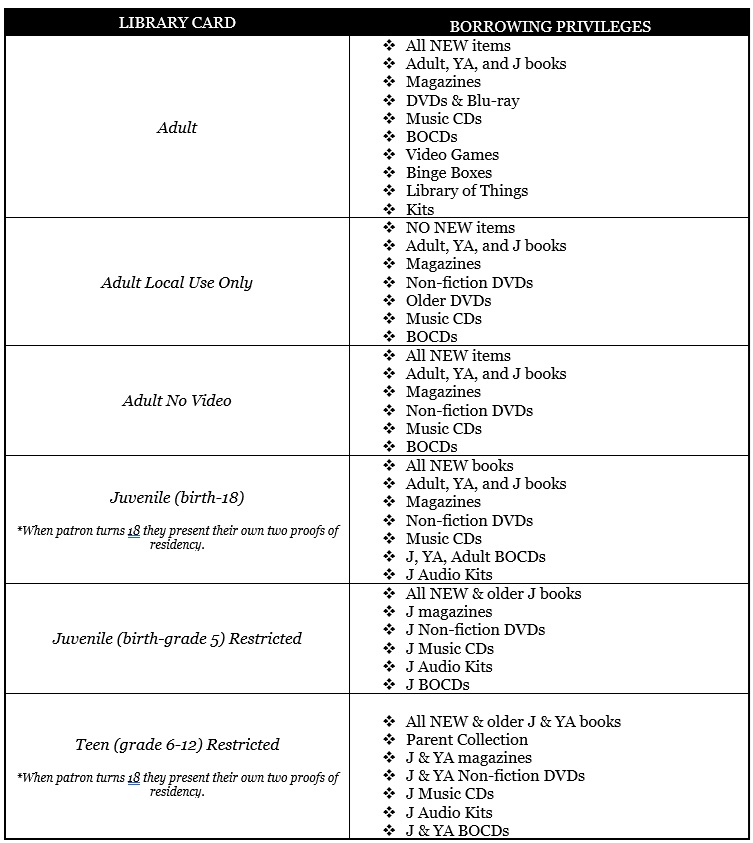
New Items, including books, A/V materials, Blu-rays and specialty kits can only be checked out by West Babylon Cardholders.
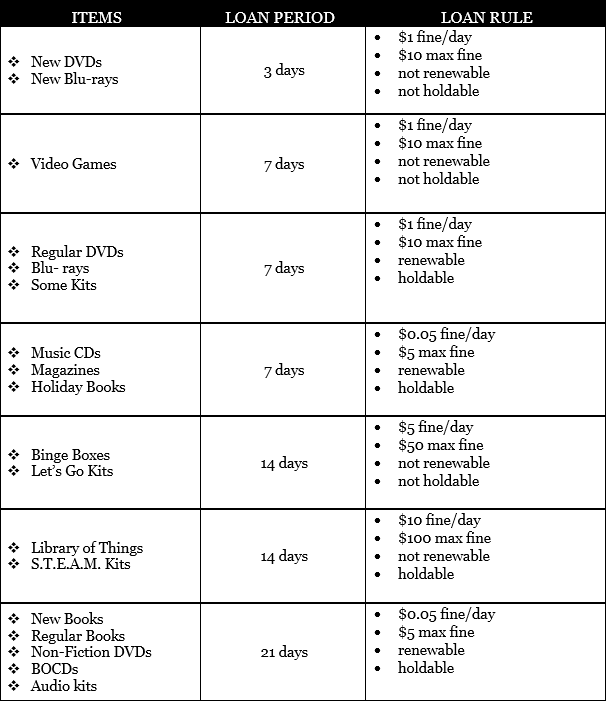
Item Renewal
Some checked out items now automatically renew so you don’t have to worry about missing due dates! With a valid email in your Library account you will receive a courtesy email letting you know what has been renewed and what is not eligible. Library cardholders should review due dates online when they use the view your account option.
Optionally you can manually renew items using one of the methods listed below :
- Self renewal, via your Library account. Using your Library card, you create your own password to view your account and renew items.
- By telephone, you must have your Library Card number.
- At the Circulation Desk, by a staff member.
Reserves
Search the catalog to find the item you want, and the item is checked out, click on the Request link. You will need your Library card to place the reserve. You will be contacted by phone when the item is available.
Non-Residents
Please be aware that our loan rules may differ from your home Library. Ask at the Circulation desk for more information.